Out with the GOOG in with the Muse
TLDR; I was losing my mind with how slow our TV was, so I used Claude to reduce the memory usage of my TV launcher from 356 MB to 23–27 MB, while reducing screen draws to about 365 ms from a cold start. Finally, I swapped out the Google assistant with Muse!
| Before | After | |
|---|---|---|
| Launcher memory | 356 MB (FLauncher) | 23–27 MB |
| Free memory, 2 min after boot | 1.23 GB | 1.57 GB |
| Swapped to storage, 2 min after boot | ~414 MB | ~156 MB |
| Cold start to a full home screen | FLauncher’s frames took up to ~5 s each | ~365–400 ms |
| Back to home from an app | Lots of button mashing | ~150–220 ms |
| Janky frames while scrolling | Too many | 0–3% |
We bought a TCL Google TV back in December 2021 and it’s more or less been in perpetual decline since then. I spent an afternoon back in ~2024 in Developer Mode trying to rip out all the bloat and ads, and switching to alternate launchers. While FLauncher more or less fixed our issues, inevitably the TV would slow to a crawl and need full restarts every few days. Generally it just seemed awful at random, and I was getting to the point where I was going to just throw it in the trash.
I was doomscrolling on X the other night and noticed that people have been using Claude to fix their TVs, so figured I’d give it another shot.
Undoing My Mistakes First
It began by pointing out that I’m an idiot and forgot to uninstall one of the other launchers (Projectivy) I had co-installed with FLauncher, but FLauncher was also still eating up 356 MB of memory. Two minutes after a reboot it had already shoved ~414 MB into swap on the slow internal storage, which is why the remote felt so laggy. There were also several other apps starting on boot, but more on that later.
“Make it Faster”
First up was a proper cleanup over adb (Android’s debugging tool, over the network). Claude went through every app on the TV and we ripped out anything we didn’t use:
- TCL’s junk: TCL Channel, the Alexa integration, eSticker, the ad “message box”, the home content feed, the manual, and a few others
- Google extras I never touch: the Play Movies / Google TV app, Play Games, YouTube Music, TalkBack, Calendar sync
- My own leftovers: two file managers, Downloader, Tubi, ABC, the Roku Channel, Plex, and of course Projectivy
It also blocked a dozen streaming apps from running in the background (except Spotify, so music and casting still work), turned off the system animations, and capped how many apps Android keeps cached in memory. Everything’s reversible - the apps are only removed for my user, so one command (or a factory reset) brings them back.
That alone cut the memory being shoved into swap right after boot by about two-thirds (~414 MB down to ~139 MB).
The Fun Part - A Custom Launcher
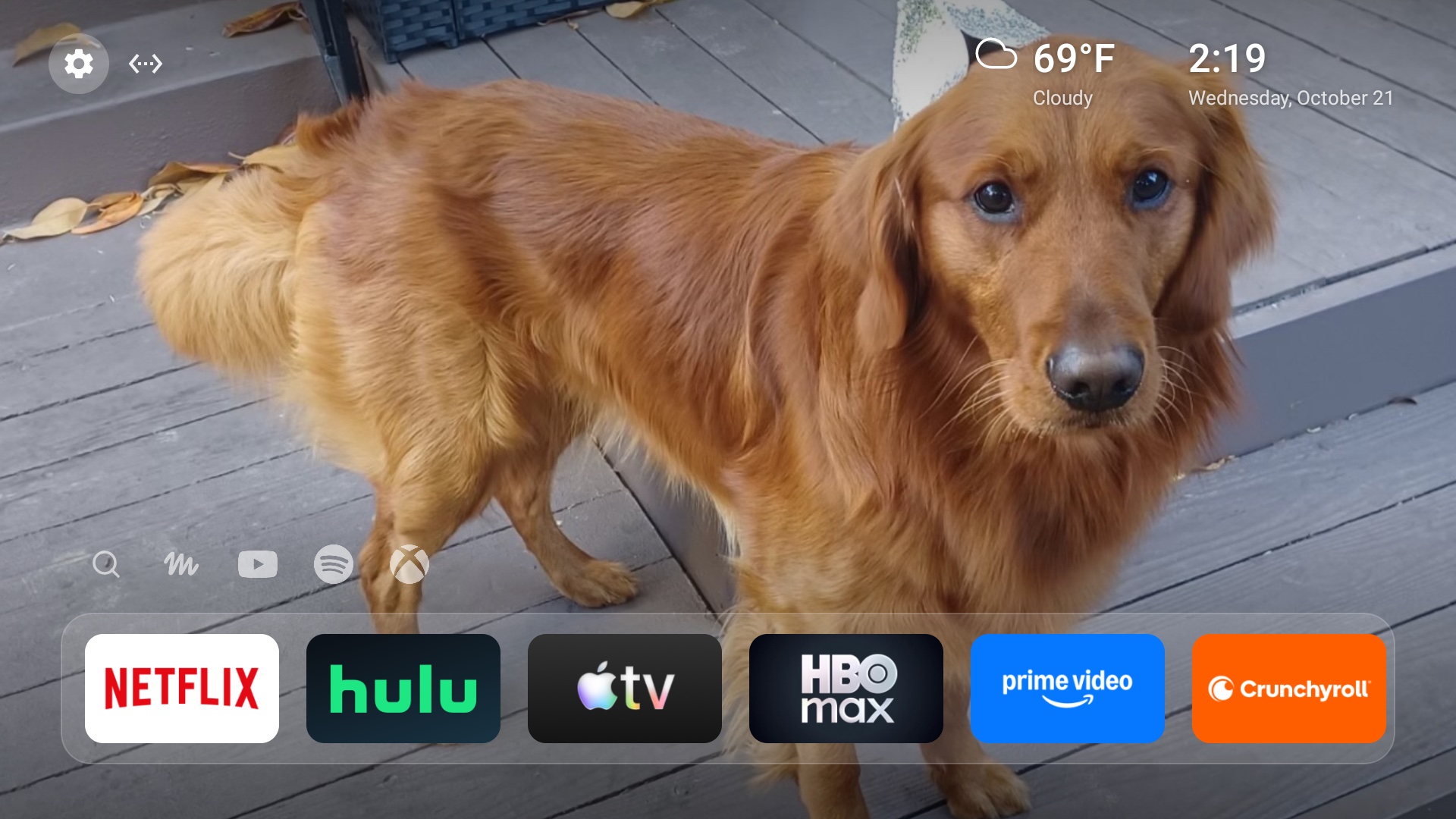
Since I’ve never loved the other launchers and I had already started building a better household watchlist app, I decided to DIY a launcher. I started with Arc Launcher since I liked the minimalist view, but decided to switch from Flutter to native Kotlin for a smaller binary size and memory footprint.
The goal was simple: as fast as possible, and nothing running that doesn’t need to be. The whole thing is a ~75 KB app with zero dependencies, and here’s what ended up in it:
- One row of “channels” that scrolls sideways, and pinned apps as a strip of little white logos above it for search, YouTube, Spotify, and my Xbox (which jumps straight to HDMI 2)
- Wallpapers from my own photos, served over LAN. I built a little web page to crop them, the server resizes them to exactly what the TV draws, and each one slowly pans and zooms
- Weather, time and date in the corner (I just typed in my ZIP code, since it turns out location services don’t work as expected on TV Android)
- Continue watching below the fold - most of the streaming apps quietly keep a “continue watching” list on the TV that Google TV just ignores, so the launcher reads it
- Move and hide apps by holding OK on a tile
- The Settings button works again - it had been dead ever since I disabled the Google TV Home Screen
The trick to making it fast was making Android do as little as possible: every app tile gets drawn once into a single image and cached, photos get decoded straight into graphics memory at their final size, and scrolling just slides things around instead of redrawing them. It draws the entire home screen in its very first frame, about 365 ms after a cold start.
Muse as Assistant
Next up was getting the mic button on the remote to talk to Muse (Meta’s assistant) instead of Google Assistant. Claude decompiled Google’s remote service app to figure out how the mic button hands off to the assistant, and it turns out the button goes to whichever app holds Android’s “assistant” role. So the launcher just became the TV’s assistant. Of course it wasn’t that simple:
- The remote couldn’t see my app. Android 11 hides apps from each other, so the launcher pretends to handle “find my remote” just so Google’s remote service can find it
- TCL kills it after every reboot. TCL blocks apps from being started in the background, so the assistant silently died until Claude found TCL’s own auto-start permission
- Google keeps the good mode for itself. Any assistant that isn’t Google’s gets the remote’s “legacy” mode, where the mic only turns on once an app starts recording
Here’s what it does now:
- Press the mic and the Muse “M” draws itself at the top of the screen while you talk, with a little bubble underneath for the status and Muse’s answer
- Muse can drive the TV - open apps, switch to the Xbox, play/pause, volume - and the bubble gets out of the way when it does
- Muse can take a screenshot to see what’s on the TV (streaming apps come out black thanks to DRM, but menus show up)
- Answers are text for now - Muse can reply in its own voice, but that’s behind a flag
The most annoying part was speech-to-text. For about a day, Google’s own speech recognizer worked perfectly, with my words showing up live in the bubble and Muse answering a few seconds faster. The next morning it was dead. Claude traced it to Google’s app restarting its old assistant service 10 seconds after it starts up, which Android then blocks from using the mic, and that blocks the mic for all of Google’s app, recognizer included. There’s no way to turn that off on this TV without root, so I gave up on Google and switched to Meta’s own speech-to-text instead. I grabbed a developer key on Meta’s Model API, and the launcher now streams the remote’s audio to Muse Voice Transcribe while I talk. My words show up live in the bubble, the finished text lands about 2 seconds after I press the button. It costs $0.18 per hour of audio. If Meta can’t be reached, the recording gets trimmed of silence and sent to Muse as a voice clip instead (this is slower for now, but it’s also free).
Want to Try It?
The launcher and setup notes are on GitHub: natestraub/custom-android-tv-launcher.